Field service management For industrial field service: three modules to choose from based on your needs
Field service management, service ticketing with video assistance, knowledge management. Start with one module, then add the others when you need them.
What is the " field service management " (FSM)?
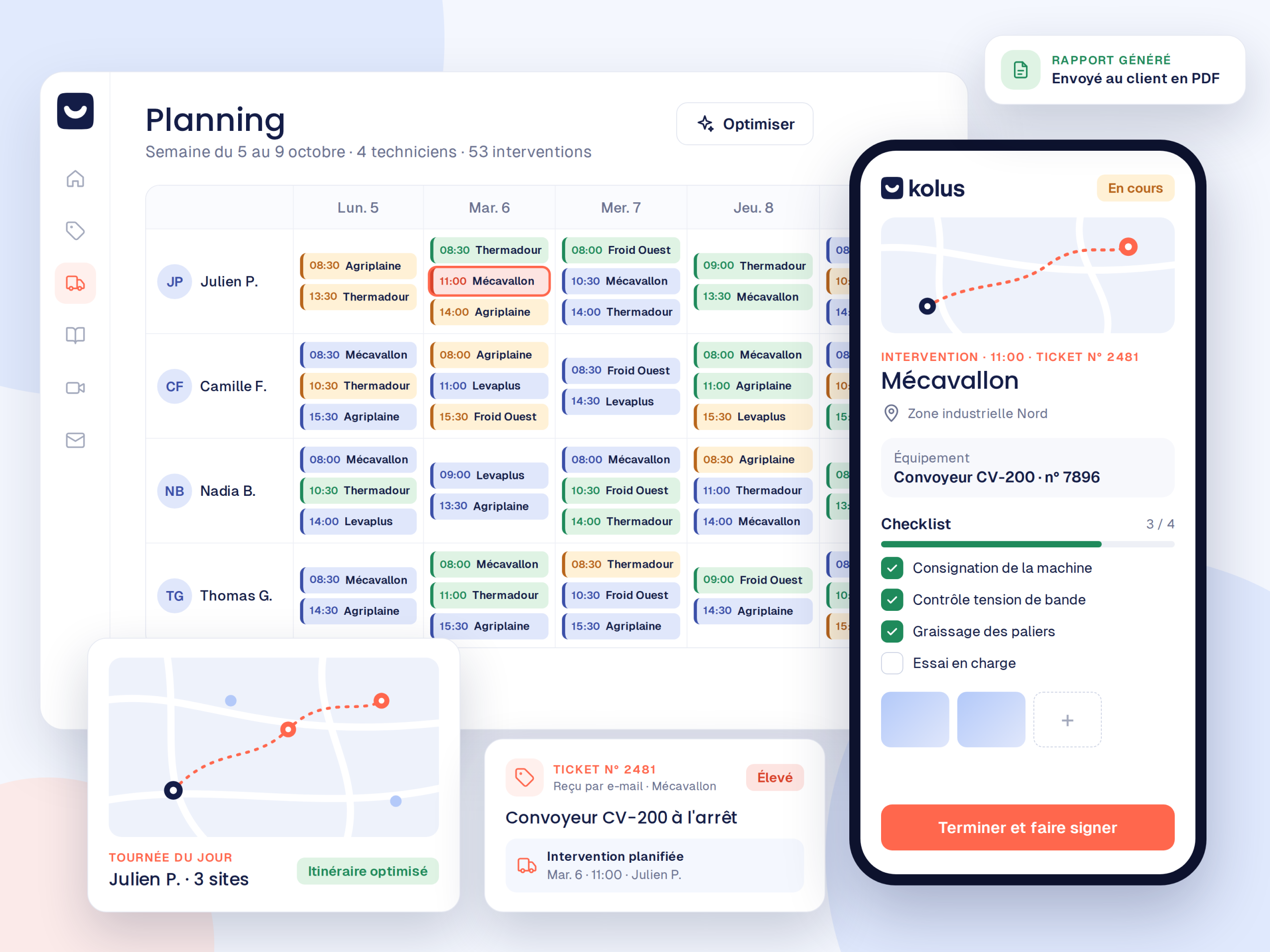
field service management refers to the management of on-site technical service calls: route planning, technician tracking, and service call reports. Kolus applies this field service management to industrial field service for machinery and technical equipment, from the initial remote diagnosis through to final billing in your ERP system. This is also referred to as service call management software FSM or service call management software.
The three modules of the field service platform
Each building block addresses a key phase of field service and also operates independently.
Field service management
First, schedule your technicians on a map view, then equip them with a smartphone app that works offline. Finally, receive AI-generated voice work order reports.
Service ticketing and video assistance
Each customer request becomes a tracked ticket. With included video assistance, you can also see the breakdown before dispatching a technician.
Knowledge management
Preserve your experts' know-how: centralized PDF manuals and troubleshooting guides can be queried in plain language by your technicians thanks to AI.
The lifecycle of a request with Kolus
Each module covers a part of this journey, so you can adopt just one or deploy all three.
Request Received
First, the client reports their breakdown via email or a smart form. The ticket is then created with the relevant machine.
Remote Diagnosis
Next, the support expert assesses the breakdown via video, validates the diagnosis, and prepares the necessary spare parts.
Scheduled Service Call
Then the service call is placed on the map-based schedule according to skills and availability.
Report & Knowledge
Finally, the technician dictates their report via voice on a mobile device. The report is signed, and it also enriches the knowledge base.
Already have tools? Keep them
Kolus integrates with your ERP and messaging systems to synchronize your machine fleets, inventory, and schedules without double entry.






Your ERP is not listed? In this case, Kolus provides an open REST API and webhooks that allow connection to any ERP or industry-specific software on the market. View all integrations →
For the office and the field
Constant synchronization between desk-based support teams and field technicians.
For Office Teams
- Omnichannel intake and sorting for all customer requests.
- Visual remote diagnosis with annotations to qualify the breakdown.
- Smart map-based scheduling according to skills.
- Real-time tracking of route progress and SLAs.
For Field Technicians
- Today's schedule, addresses, and GPS routes directly on mobile.
- Machine history and technical documentation accessible on-site.
- Voice-dictated report:AI drafts technical reports.
- Customer signature on screen and immediate sending without evening data entry.
Drive your field service with data
Key indicators automatically consolidated from field reports and closed tickets.
Deadlines and SLA Compliance
Measure the average handling and resolution time for each client contract, and anticipate overruns.
FTFR resolution rate
Track the proportion of breakdowns resolved on the first visit, and identify machines requiring recurring returns.
Warranty costs
Calculate the actual cost of warranty service calls:allowing you to adjust your machine pricing and maintenance offers.
Designed for multi-site and international installed bases
Interface available in over 20 languages (French, English, German, Spanish, etc.), automatic translation of client communications into 35 languages, and multi-subsidiary consolidation.
The leading solution for manufacturers
Machine manufacturers, distributors, and rental companies rely on Kolus every day.
200+
Industrial clients
5 000+
Active users
8 000+
Service calls per month
20+
Interface languages
Frequently asked questions about the Kolus platform
Everything you need to know about the suite's modularity and integration.
What is the " field service management " (FSM)?
field service management (FSM) refers to the comprehensive management of field service calls: receiving requests, map-based scheduling, a mobile app for technicians, voice-activated work order reports, and invoicing within the ERP system.
What is the difference between " FSM " software and a CMMS?
A CMMS manages the internal maintenance of a factory’s equipment. In contrast, Kolus is a software solution for FSM and field service designed for manufacturers, distributors, and service providers who work on machines sold or leased to their external customers.
Is it mandatory to subscribe to all three modules?
No. Each module (field service, ticketing with video assistance, knowledge) is independent and can be subscribed to separately. You can, for example, start with ticketing without changing your scheduling tool.
How does Kolus integrate with our current ERP?
Kolus synchronizes bidirectionally with the main market ERPs (Sage, SAP, Odoo, Microsoft Dynamics, Codial, OpenProd) using certified API connectors to exchange customers, machine fleets, and reports.
Does the mobile app work without an internet connection?
Yes. In basements or 4G dead zones, technicians can take photos, get customer signatures, and record voice notes. These items then sync as soon as network coverage returns.