The mobile service app designed for your technicians
With the Kolus technician application, the day's schedule, the service order, and the machine history are right in your pocket. Then, the report is voice-dictated, even without a network connection.
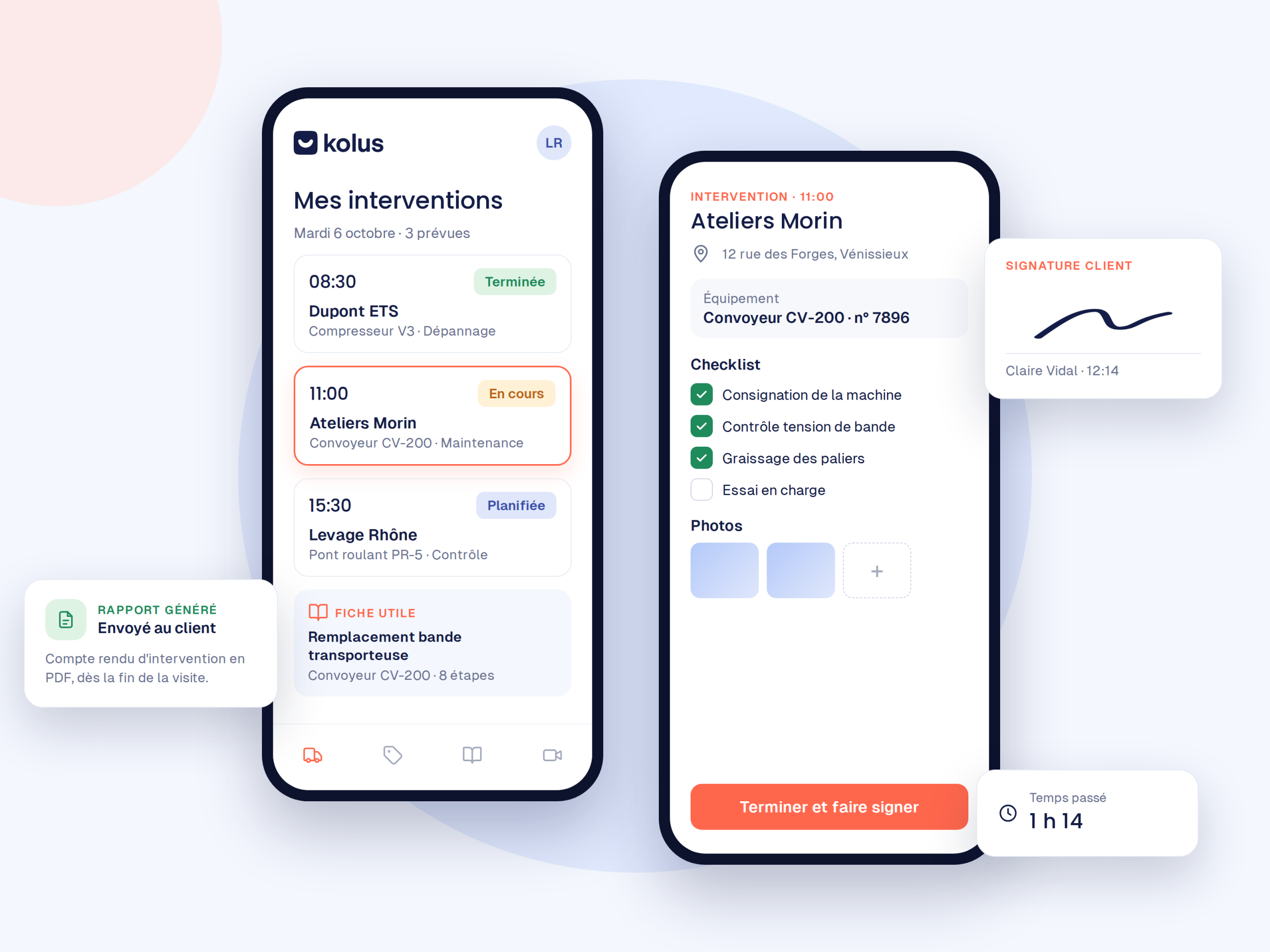
Everything your team needs on site, without calling the office.
Each service call brings together all relevant data, allowing technicians to work quickly and independently.
Schedule and routing
Daily service calls displayed in real time, with directions opening in a single click using Waze, Google Maps, or your preferred GPS app.
Schedule and mapping →Service work order
Client, address, machine model, preliminary diagnosis, and required parts:the technician knows what to expect before arriving.
Pre-filled from the ticketMachine history
All past service calls for the equipment, previous recurring issues, and recently replaced parts.
Complete traceabilityTechnical documentation
Manufacturer manuals, electrical diagrams, and troubleshooting procedures are easily accessible through an AI search tool that finds the right page.
Knowledge management →Voice-dictated report
A simple voice note recorded at the end of the service call is all it takes. The AI then generates a clear and structured report.
Discover the voice report ↓Offline mode
No signal in the basement or plant? The technician simply takes photos, gets the customer's signature, and records a voice note. Everything automatically syncs once 4G is restored.
Offline functionality ↓Work order reports are dictated, not typed anymore.
No more typing chores on a phone keyboard:your technicians speak, and Kolus writes.
Dictate
First, at the end of the service call, the technician records their observations verbally in one minute.
AI writes
Identified problem, cause, actions taken, parts used, and recommendations:the report is then structured automatically.
Approve
Finally, they quickly review it, attach timestamped photos, and have the customer sign directly on the screen.
| Without Kolus | With Kolus |
|---|---|
| A report written in a hurry in a parking lot at the end of the day. | A comprehensive report that is ready immediately at the end of the service call. |
| Incomplete, illegible, or frequently forgotten reports. | Comprehensive reports always written to the same professional standard. |
| The field service manager spends their time constantly chasing technicians. | The field service manager receives a usable report to invoice on the same day. |
Your technicians carry out service calls even without a network connection.
In a basement, a heavily shielded technical room, or an industrial dead zone, the application automatically detects the loss of connection:photos, signatures, and voice notes remain available.
Photos and signature
Timestamped photos and the customer's on-screen signature therefore work without a network connection.
Delayed voice note
The voice note is recorded locally while offline. AI then writes the report as soon as the network returns.
Automatic synchronization
Nothing is lost. As soon as a 4G connection is recovered for a few seconds, this data is sent back to the office and into the ERP.
A technician app designed for the field, not for IT specialists.
An interface built for the actual constraints of industrial service calls.
Clear screens
Large buttons and direct actions:making them usable with gloves and in demanding factory environments.
Natural adoption
The app resembles consumer mobile tools, meaning your teams adopt it from their very first shift without extensive training.
Less data entry
Voice dictation and checklists replace the keyboard, allowing your technicians to stay focused on their technical work.
The technician no longer arrives at a site without knowing the issue.
With Kolus ticketing, they actually find all the diagnostic work done beforehand:customer photos, breakdown hypotheses, and ordered parts.
- The ticket follows the technician into the field with all its context.
- The work order report finalizes the ticket and closes the file.
- The office monitors the progress of service calls in real time.
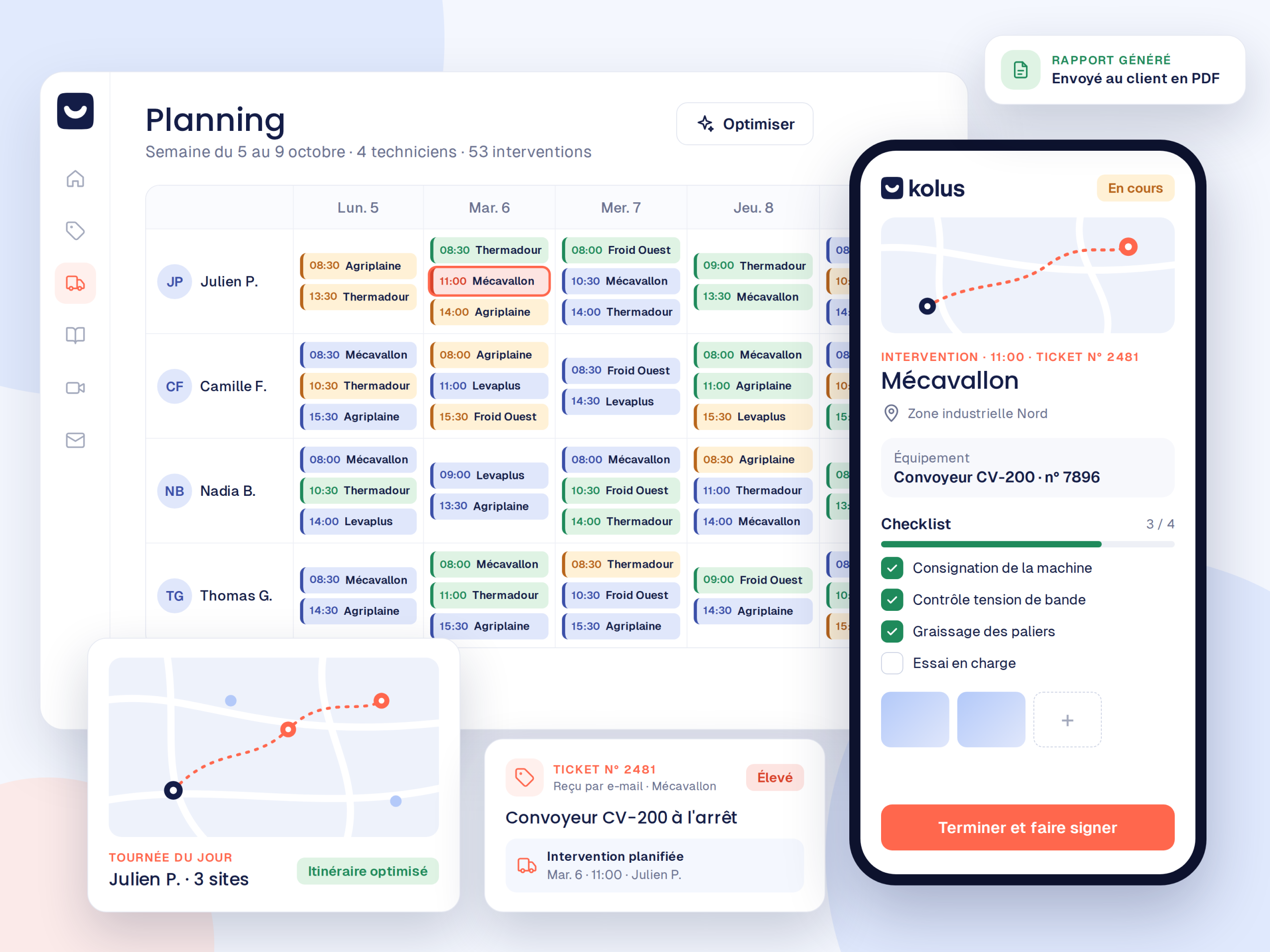
Your work order reports flow back into your ERP
Time spent, spare parts used, and signed reports automatically update your inventory and billing.





Frequently asked questions
What is a good digital service work order?
It replaces the paper form:customer, machine, diagnosis, parts used, and signature. With Kolus, it is also automatically pre-filled from the service ticket processed at the office.
How to generate a work order report automatically
The technician dictates a voice note at the end of the service call. AI then turns it into a structured work order report complete with timestamped photos and replaced parts.
Does the app work without a network connection?
Yes. The app detects when the connection is lost, so photos, the customer’s signature, and voice notes continue to work even without a network connection. Once the network connection is restored, this data is then synchronized. The app is part of the FSM software suiteKolus.
Which devices is it compatible with?
On iPhone and Android, smartphones and tablets. The technician app can be downloaded directly from the App Store and Google Play.
Do data flow back into our ERP?
Yes:validated work order reports, time spent, and parts used are automatically synced with your ERP to trigger invoicing and update inventory.